

Every software team — no matter how small — ships bugs. The question isn’t whether to track them; it’s which tool fits your team without adding overhead of its own.
If you’ve searched for a lightweight bug tracker for small teams, you’ve probably noticed that most results point to enterprise tools with 50-page setup guides. This guide cuts through that noise. We’ll cover what actually matters when choosing a bug tracker, compare the four most common approaches honestly, and help you pick the right one for where your team is right now.
What Small Teams Actually Need From a Bug Tracker
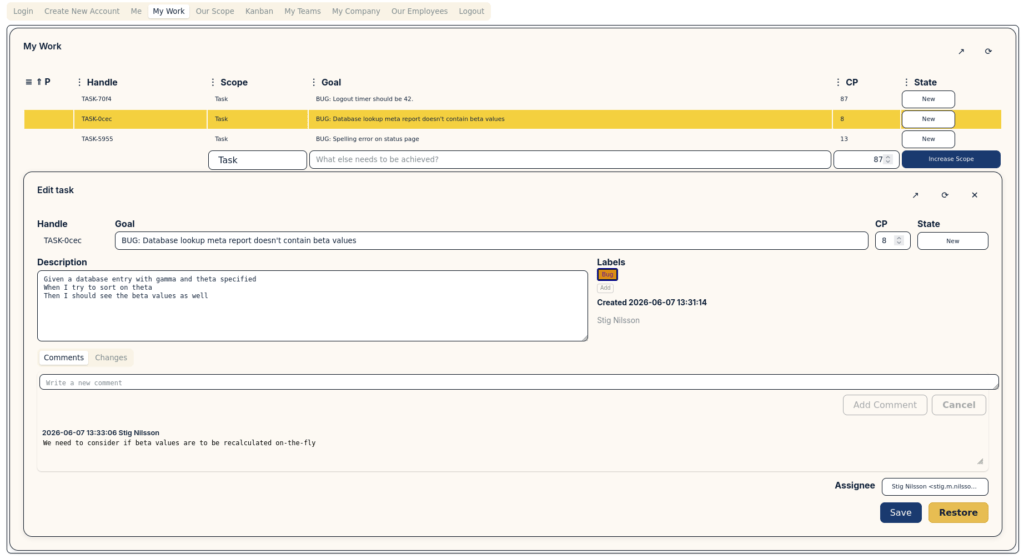
Before comparing tools, it’s worth getting clear on requirements — because “lightweight” means different things to different teams.
Fast issue capture
A bug tracker is only useful if bugs actually get logged. If opening a new issue takes more than 30 seconds, your team will skip it and use Slack threads instead. Look for quick-add forms, browser extensions, or email-to-issue inboxes.
Clear ownership
Every bug should have one person responsible for resolving it. Without clear assignment, issues drift indefinitely. Your tracker needs assignees, and ideally some way to filter by assignee so each dev knows what’s theirs.
Status visibility
Can you answer “what’s blocking this release?” in under a minute? A good lightweight bug tracker gives you a real-time view of open, in-progress, and resolved issues without requiring you to build a custom dashboard.
Low maintenance
Small teams don’t have a dedicated project manager to groom the backlog every week. You need a tool that stays clean without constant curation — sensible defaults, automatic closures, and minimal configuration.
Integration with how you already work
The best bug tracker is the one that slots into your existing workflow. If your team lives in GitHub, a GitHub-native solution wins even if it’s slightly less powerful. Friction kills adoption.
The Four Main Approaches (Compared Honestly)
1. Spreadsheets (Google Sheets, Excel, Airtable)
Spreadsheets are the fallback — and for solo founders or tiny teams, they’re not wrong. You can set one up in five minutes, everyone knows how to use them, and there’s zero cost.
Where they break down: Spreadsheets don’t send notifications, don’t enforce status transitions, and become a mess once you cross ~30 open issues. They also make it nearly impossible to link a bug to a git commit or a customer report. Once a team has more than two people actively logging bugs, spreadsheets create more confusion than they resolve.
Best for: Pre-launch solo projects, internal tooling with a single developer, or temporary tracking during a crunch when you’ll migrate later.
2. GitHub Issues
If your team already uses GitHub for code, GitHub Issues is the default first step — and a genuinely solid one. Issues are free, co-located with your code, and can be referenced directly from commits and pull requests.
Labels and milestones give you basic triage. The Projects board (now with table and roadmap views) adds a Kanban layer on top. For teams shipping open-source software, GitHub Issues is almost always the right answer because it keeps the bug reporting loop open to your users.
Where it breaks down: GitHub Issues is good for developers but awkward for non-technical stakeholders. There’s no SLA tracking, no customer-facing portal, and the filtering UI gets clunky at scale. It’s also tied to GitHub — if you ever migrate hosting, your issue history doesn’t travel cleanly.
Best for: Developer-only teams, open-source projects, startups where the whole team is technical and already using GitHub daily.
3. Jira (and Jira-alikes: Linear, Shortcut)
Jira is the industry standard for a reason: it’s powerful, flexible, and deeply integrated with the broader Atlassian ecosystem. Linear is a faster, modern alternative with a strong developer following.
But “powerful and flexible” comes with a cost. Jira configuration is a part-time job. Workflows, schemes, permission sets, custom fields — every one of these needs someone to set it up and maintain it. Small teams consistently report that Jira’s overhead exceeds the value it delivers until they reach 10–15 engineers.
Linear is meaningfully lighter than Jira, and it’s worth a look if you want something more opinionated. But it’s still optimized for product teams running structured sprints, not teams that want simple bug triage.
Where it breaks down: Setup time, ongoing administration, cost (Jira’s free tier is limited and the paid tiers add up), and the sheer cognitive load of a full-featured PM tool when you just need to track “button is broken on mobile.”
Best for: Teams of 200+ with dedicated project management, complex workflows, or strong Atlassian dependencies elsewhere in the stack.
4. Modelithe
Modelithe is purpose-built for the gap between “spreadsheet” and “Jira” — teams that need a real bug tracker without the enterprise overhead. It’s designed for small teams who want structured issue tracking, automated status management, and clean reporting without hiring a Jira admin.
Issues are fast to create, assignment and priority are first-class citizens, and the dashboard surfaces what matters without configuration. Modelithe also offers email-based submission so non-technical stakeholders can report bugs without needing an account.
For teams looking to reduce low-overhead bug tracking — getting the discipline of structured tracking without the ceremony of an enterprise tool — Modelithe is designed to be that middle ground.
Best for: Small engineering teams (2–10 developers), SaaS products with external bug reporters, teams that have outgrown spreadsheets but find Jira excessive.
Feature Comparison Table
| Feature | Spreadsheet | GitHub Issues | Jira / Linear | Modelithe |
|---|---|---|---|---|
| Setup time | 5 minutes | 5 minutes | 4–8 hours | 5 minutes |
| Cost (small team) | Free | Free | $8–20/user/month | Affordable |
| Notifications | Manual | Email / GitHub | Full | Email + in-app |
| Non-technical reporters | Yes | Difficult | Yes (with training) | Yes |
| Git/code integration | No | Native | Via plugins | Yes |
| Reporting / dashboards | Manual | Basic | Extensive | Built-in |
| Admin overhead | None | Low | High | None |
| Scales past 50 open issues | Poorly | Reasonably | Yes | Yes |
| Best team size | 1–2 | 2–8 (all devs) | 8+ | 3+ |
How to Choose: A Decision Framework
Rather than picking based on feature lists, use these questions:
Is your whole team technical and already on GitHub?
Start with GitHub Issues. It’s free, zero-friction, and integrates directly with your code. You can always migrate later.
Do you have non-developer stakeholders reporting bugs?
You need a tool with a customer-facing submission form or email intake. GitHub Issues won’t work well here. Look at Modelithe or a hosted help desk.
Are you running structured sprints with planned releases?
If you’re doing formal sprint planning, Linear or Jira earn their overhead — especially once you have a PM coordinating across teams. Below 8 engineers, Linear is the lighter choice.
Have you outgrown a spreadsheet but aren’t ready for Jira?
This is exactly the problem Modelithe solves. You want real tracking, real notifications, and real visibility — but you don’t want to spend a week on configuration and ongoing admin.
Common Mistakes When Setting Up Bug Tracking
Over-engineering the workflow before you have data
It’s tempting to design the perfect priority matrix and status flow before you’ve logged a single bug. Resist it. Start simple (Open → In Progress → Done), observe where bugs get stuck, and add complexity only when you can point to a specific problem it solves.
No ownership rule
An unassigned bug is a forgotten bug. Enforce a rule: every issue has one owner before it closes. Even if “we’ll decide later,” assign it to someone to triage.
Logging everything as high priority
When everything is high priority, nothing is. Establish a simple four-level priority system (Critical / High / Medium / Low) using Labels and be ruthless about what Critical actually means: “production is broken for paying customers right now.”
Skipping reproduction steps
A bug report without reproduction steps is a guessing game. Use a template that requires: what happened, what was expected, steps to reproduce, environment (browser, OS, device). Even a lightweight tracker can enforce this with a default issue template.
Never closing old bugs
Every tracker accumulates stale issues. Schedule a monthly 20-minute triage pass: close anything that can’t be reproduced, defer anything low-priority you’re not going to fix in the next quarter, and archive anything older than six months that was never acted on.
Getting Started Without Overthinking It
The best bug tracker is the one your team actually uses. Don’t spend a week evaluating tools — spend an afternoon trying one.
If you’re a developer-only team on GitHub, turn on GitHub Issues today. If you have external reporters or want structured tracking without the setup pain, try Modelithe.
The goal is to stop bugs living in Slack threads, email chains, and people’s heads — and get them into a single place with clear ownership. Almost any tool accomplishes that if your team commits to using it consistently.
Once you’ve nailed the basics, you can look at more advanced topics like SLA tracking, webhook integrations, and automated triage. But for most small teams, the simple discipline of logging, assigning, and closing bugs in one shared place is already a major upgrade.
Already tracking bugs but finding the process too heavy? Read our guide on low-overhead bug tracking for tips on keeping the process lean as your team grows.